From ATS‑Friendly to ATS‑Optimized Resume
From ATS‑Friendly to ATS‑Optimized Resume
Why ATS Matters in Modern Hiring
When you apply for a job today, the first “reader” of your resume is almost never a recruiter. It’s an Applicant Tracking System (ATS). These systems handle the flood of applications companies receive, scanning resumes for formatting, keywords, and relevance before a human ever looks at them.
👉 Continue reading — because we’ll share a friendly ATS resume template (DOCX) you can use to build your own ATS‑friendly resume and start tailoring it for every application.
Here’s the critical point: ATS doesn’t reject you — it filters you in. If the system recognizes your resume as a strong match to the job description, you cross the threshold and move forward to a recruiter’s desk. If it doesn’t, you remain invisible.
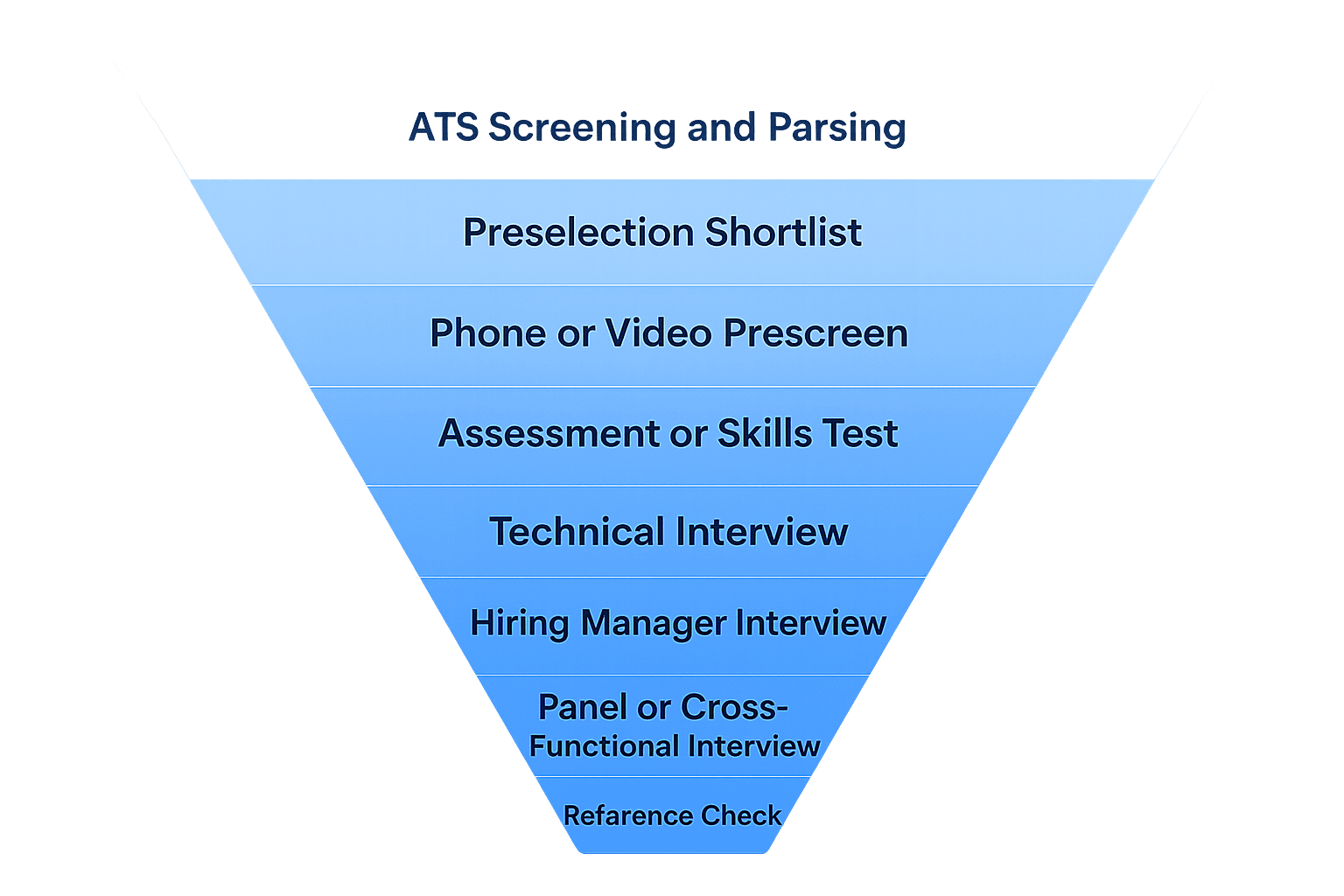
That threshold is often brutal. In many cases, only 5–10% of applicants make it past ATS to be reviewed by humans. And because keyword matching is crude, even excellent candidates can be overlooked. If your resume says React.js but the job description says React, the system may not connect the dots. If you improved accessibility but didn’t explicitly mention WCAG, the ATS may miss it entirely.
Understanding ATS is therefore essential. It’s not about tricking the system — it’s about making your resume easy to parse, easy to match, and impossible to miss.
What Is an ATS‑Friendly Resume?
An ATS‑friendly resume is your baseline template — the version you build once and then adapt for each application. Its purpose is to ensure the ATS can parse your information correctly and recognize your qualifications without errors.
The hallmarks of an ATS‑friendly resume are:
- Clean formatting with no tables, columns, or graphics
- Clear section headings like Work Experience, Education, Skills, Profile/Summary
- Bullet points that describe achievements in 2–4 sentences
- Quantifiable outcomes (numbers, percentages, measurable improvements)
- Standard fonts (Arial, Calibri, Times New Roman)
- Dates in MM/YYYY format
- Saved in DOCX format, exported to PDF when sending
- Keywords included naturally, without overstuffing
👉 You can instantly check whether your resume meets ATS‑friendly standards by running it through the free ATS Compatibility Checker at ResumeAiTool.com/#ats-checker. It’s not perfect, but it emulates how top ATS platforms scan resumes and will show you where your current version is weak — formatting errors, missing headings, vague bullets — so you can fix the foundation before tailoring.
What Is an ATS‑Optimized Resume?
An ATS‑friendly resume is the foundation, but it’s not enough to guarantee visibility. To actually get past the ATS cut‑off line and into the recruiter’s hands, you need an ATS‑optimized resume.
Here’s the difference:
- ATS‑friendly = correctly formatted so the system can read it
- ATS‑optimized = formatted and strategically tailored to the job description with targeted keywords
Optimization means aligning your resume with the exact language of the job posting. ATS systems don’t understand synonyms, context, or transferable skills. They simply scan for keyword matches. If the job description says WCAG accessibility and your resume only says accessibility improvements, the system may not recognize the match.
Why optimization matters:
- Ensures your resume crosses the ATS threshold
- Places you in the top 5–10% of applicants recruiters actually see
- Prevents random luck from deciding whether your resume is filtered in or ignored
An ATS‑optimized resume doesn’t exaggerate or invent achievements. It simply makes your real skills and experience visible to the system. By weaving in keywords naturally — React, TypeScript, CI/CD, accessibility, performance optimization — you make it easy for ATS to recognize you as a strong fit.
The Pain of Manual Tailoring
Every recruiter will tell you: candidates who tailor their resumes to each job description consistently rise to the top. The problem is that manual tailoring is slow, exhausting, and error‑prone.
For every application, you’d need to:
- Read the job description carefully
- Identify the keywords and skills the ATS will be scanning for
- Edit your resume to include those terms naturally in Work Experience, Skills, and Profile
- Double‑check formatting to ensure nothing breaks ATS parsing
Doing this by hand for dozens of applications each week can take hours. And if you skip it, you risk being the perfect candidate who never gets seen because someone else optimized their resume better.
Manual tailoring works — but it’s not scalable.
How ResumeAiTool.com Works
ResumeAiTool.com automates the tailoring process, giving you the power to create a job‑specific resume in seconds.
Workflow:
- Upload your resume in DOCX format
- Paste the job description
- Download your optimized resume in DOCX or PDF
✨ Apply with confidence — never get rejected for skills you actually have.
Unlike generic optimizers, ResumeAiTool.com doesn’t guess or add skills you don’t possess. Instead, it highlights your real seniority, experience, and the companies you’ve worked for, so every application feels authentic and tailored.
Why candidates choose ResumeAiTool.com:
- Job‑specific optimization aligned with the exact job description
- ATS‑friendly precision that matches the keywords recruiters are searching for
- Authentic tailoring with no fake skills or invented experience
- Transparent results showing exactly what was changed and why
- Fast and effortless workflow: upload → paste → download in seconds
- Fair pricing: pay‑as‑you‑go starting from $0.20 per optimized resume. No subscriptions, no long‑term commitments
Before optimizing, you can run your resume through the free ATS Compatibility Checker at ResumeAiTool.com/#ats-checker. It’s not perfect, but it emulates how top ATS platforms scan resumes and shows you where your current version is weak — formatting errors, missing keywords, vague bullets — so you can fix the foundation before tailoring.
ResumeAiTool.com ensures you always have a resume that is both ATS‑friendly (baseline formatting) and ATS‑optimized (keyword‑targeted for each job). That combination consistently lifts candidates into the recruiter’s top stack.
The Difference in Outcomes
The gap between an ATS‑friendly resume and an ATS‑optimized resume is the difference between being invisible and being seen.
-
ATS‑Friendly Resume
Ensures your resume is parsed correctly. It prevents rejection due to formatting errors and guarantees that your information is captured. But it may still rank too low if keywords don’t match the job description. -
ATS‑Optimized Resume
Goes beyond formatting. It aligns your resume with the exact language of the job description, integrates keywords naturally, and highlights your real achievements in the terms recruiters expect. This is what pushes you above the ATS threshold and into the recruiter’s top stack.
The outcome difference is dramatic: ATS‑friendly resumes keep you in the game, but ATS‑optimized resumes put you in the spotlight. Candidates who consistently tailor their resumes per job description — whether manually or with ResumeAiTool.com — often see recruiter callbacks increase by up to 10x.
Final Checklist Before You Apply
Before you hit “submit,” run through this quick checklist to make sure your resume is ready:
-
Formatting applied correctly
No tables, columns, or graphics. Standard fonts only. Dates in MM/YYYY format. Resume saved in DOCX, exported to PDF for sending. -
ATS compatibility checked
Upload your resume to the free ATS Checker at ResumeAiTool.com/#ats-checker. Review the diagnostic feedback to see where your current resume is weak and fix those issues. -
Optimization completed
Paste the job description into ResumeAiTool.com. Download the tailored ATS‑optimized resume. Confirm that keywords from the JD are integrated naturally into Work Experience, Skills, and Profile. -
Authenticity preserved
No fake skills or invented experience. Achievements are quantifiable, credible, and aligned with your real background. -
Confidence secured
- Confidence secured
Apply knowing your resume is both ATS‑friendly and ATS‑optimized. You’ve maximized your chances of crossing the ATS threshold and being seen by recruiters.
- Confidence secured
📄 Download Base Resume Template
Download ATS-friendly Resume Template (DOCX) - A clean, base ATS-friendly template to start building your optimized resume.